Sunday, 3 August 2025

Top FAQs About EDI for Beginners - Part 1

1. What is EDI?

Answer:
EDI (Electronic Data Interchange) is the digital exchange of business documents (like purchase orders, invoices, and shipping notices) between companies in a standard format — without human intervention.


2. Why is EDI important?

Answer:
EDI automates the exchange of critical business information, reduces manual errors, speeds up processes, cuts costs, and strengthens relationships with trading partners.


3. What types of documents are exchanged through EDI?

Answer:
Common EDI documents include:

  • 850 – Purchase Order

  • 810 – Invoice

  • 856 – Advance Ship Notice

  • 997 – Functional Acknowledgment

  • 940/945 – Warehouse Orders

  • 867 – Product Transfer and Resale Report


4. What are the most common EDI standards?

Answer:
The most widely used EDI standards are:

  • ANSI X12 – Mostly used in North America

  • EDIFACT – Common in Europe and globally

  • VDA – Used in the automotive industry (Germany)

  • TRADACOMS – Formerly used in the UK retail sector


5. What is a VAN (Value Added Network)?

Answer:
A VAN is a third-party network service that helps companies exchange EDI documents securely. It acts like an EDI “post office” between trading partners.


6. Do I need special software for EDI?

Answer:
Yes, you’ll need an EDI translator, integration tool, or middleware to convert standard EDI formats into your internal system format (ERP or accounting software).


7. What is an EDI 997 or Functional Acknowledgment?

Answer:
An EDI 997 is a response sent to confirm that an EDI document (like an 850 order) was received and processed correctly — not to be confused with business acceptance.


8. What is EDI mapping?

Answer:
EDI mapping is the process of translating EDI data into the internal format of your business system — and vice versa. It's how your systems understand incoming or outgoing EDI messages.


9. What are EDI communication protocols?

Answer:
These are the ways EDI files are securely transmitted:

  • AS2 – Internet-based, secure, real-time

  • SFTP/FTPS – Secure file transfer

  • HTTPS – Secure web-based transfer

  • OFTP2, PEPPOL – Industry-specific secure protocols


10. Is EDI still relevant in the age of APIs?

Answer:
Yes. While APIs are gaining traction, EDI remains a key standard in supply chain, logistics, retail, healthcare, and automotive industries due to its stability, wide adoption, and compliance features.

Saturday, 26 July 2025

Widely used EDI middleware applications in the market

Some widely used EDI middleware applications in the market along with the companies name:

1. Cleo Integration Cloud (CIC)

  • Company: Cleo

  • Key Features: EDI integration, API support, file transfer, dashboards, hybrid integration.

  • Popular For: Logistics, manufacturing, and retail integrations.


2. OpenText Trading Grid

  • Company: OpenText

  • Key Features: Cloud-based EDI, secure B2B communication, trading partner onboarding.

  • Popular For: Enterprise-level EDI solutions and compliance.


3. IBM Sterling B2B Integrator

  • Company: IBM

  • Key Features: Advanced EDI integration, supply chain visibility, partner onboarding.

  • Popular For: Large enterprises with complex B2B networks.


4. Seeburger BIS (Business Integration Suite)

  • Company: Seeburger

  • Key Features: B2B/EDI, MFT, API integration, cloud & on-premise support.

  • Popular For: Manufacturing, automotive, and logistics sectors.


5. SPS Commerce Fulfillment

  • Company: SPS Commerce

  • Key Features: Pre-built retailer connections, EDI document automation, analytics.

  • Popular For: Retail EDI, especially for suppliers.


6. TrueCommerce

  • Company: TrueCommerce

  • Key Features: Cloud EDI, order processing, inventory visibility, eCommerce integrations.

  • Popular For: Mid-size businesses and eCommerce integrations.


7. Boomi (Dell Boomi)

  • Company: Boomi (a Dell Technologies business)

  • Key Features: API and EDI integration, drag-and-drop workflows, cloud-native.

  • Popular For: Fast-growing businesses and hybrid environments.


8. MuleSoft Anypoint Platform

  • Company: Salesforce (MuleSoft)

  • Key Features: API-led connectivity, B2B integration, secure data exchange.

  • Popular For: Enterprises needing API + EDI strategies.


9. Axway B2B Integration

  • Company: Axway

  • Key Features: Secure file transfer, API + EDI integration, community management.

  • Popular For: Regulated industries like finance and healthcare.


10. DiCentral (Now part of TrueCommerce)

  • Company: DiCentral (acquired by TrueCommerce)

  • Key Features: Cloud EDI, ERP connectors, supply chain visibility.

  • Popular For: EDI with global reach.

Friday, 18 July 2025

Understanding about AS4 (Applicability Statement 4)

What is AS4 in EDI?

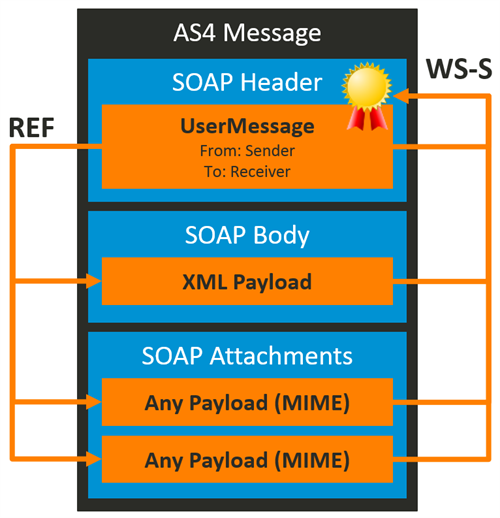
AS4 (Applicability Statement 4) is a modern secure web services-based communication protocol used for B2B data exchange, especially in EDI (Electronic Data Interchange). It is a successor to AS2, offering enhanced security, reliability, and flexibility using SOAP and web services standards.


Key Components of AS4 Architecture

Component

Description

SOAP Envelope

AS4 uses SOAP 1.2 for message structure.

ebMS Header

Metadata such as sender, receiver, message ID, and action.

Payload

Can be any type (XML, EDIFACT, X12, etc.).

WS-Security

Ensures message encryption, signature, and integrity.

Reliability

Built-in retry, duplicate detection, and delivery tracking.

P-Mode

Configuration setting that governs how messages are exchanged between partners (like service agreements).

Sunday, 13 July 2025

Understanding about SAP Port Configuration

In SAP EDI/IDoc processing, a port defines how IDocs are sent or received between systems,

Integration Scenarios

  • SAP to SAP

  • SAP to middleware (like Sterling, Boomi, Cleo, SAP PI/PO)

  • SAP to a file directory


Types of Ports in SAP:

Port Type

Description

tRFC (Transaction RFC)

Used for real-time IDoc transmission to another SAP system

File Port

Writes IDocs to a file (e.g., for middleware like Cleo, Seeburger, etc.)

ABAP-PI

Internal communication through ABAP proxy (used in SOA/web services)

XML HTTP

Sends IDocs as XML over HTTP(S)

Directory (EDI)

Sends IDoc to file system (common for outbound interfaces)


Where to Configure:

Use transaction WE21 to configure ports.


Why Port Is Important:

When SAP triggers an IDoc, it uses:

  • Partner profile (WE20)
  • Output type (e.g., BA00)
  • Port (defined in WE21)

If the port is misconfigured or missing, you'll get errors like:

  • Error while writing IDoc to file (EA084)
  • Port does not exist
  • No authorization to write file


Saturday, 14 June 2025

Understanding about AS2 MDN (Message Disposition Notification)

AS2 MDN (Message Disposition Notification):

AS2 MDN is an electronic receipt sent back to the sender after a successful (or failed) AS2 file transmission. It confirms message delivery and ensures non-repudiation (proof of delivery). It's like a return receipt in postal mail, but in the world of secure EDI communication.


AS2 Overview:

  • AS2 (Applicability Statement 2) is a protocol used to securely exchange EDI or other data over the internet using HTTP(S).

  • It supports:

    • Digital signatures

    • Encryption

    • Compression

    • MDN (Acknowledgement receipt)


MDN (Message Disposition Notification)

  • MDN is the acknowledgment that:

    • The message was received

    • The message was decrypted

    • The signature was verified

  • It may also include errors if the transmission fails.

There are two types:

  • Synchronous MDN (returned in the same HTTP connection)

  • Asynchronous MDN (returned in a separate HTTP request)


How Does an AS2 MDN Look?

An AS2 MDN is similar to an email delivery receipt and contains metadata like this:

Sample MDN (Human-readable)

Return-Path: <as2receiver@company.com>
Disposition: automatic-action/MDN-sent-automatically; processed Original-Recipient: rfc822;ReceiverAS2 Final-Recipient: rfc822;ReceiverAS2 Original-Message-ID: <AS2Sender1234@company.com> Received-Content-MIC: Wn5SxvSGz4ksklasdaasdas==, sha1
  • Disposition: indicates success or failure

  • Original-Message-ID: matches the ID of the original AS2 message

  • Received-Content-MIC: Message Integrity Check value


Sample MDN with Error (Failure)

Disposition: automatic-action/MDN-sent-automatically; failed/error: decryption-failed
Failure: The message could not be decrypted with the partner’s certificate.

Why MDN Is Important?

  • Provides non-repudiation of receipt

  • Helps in tracking and troubleshooting

  • Often required in HIPAA, retail, automotive, pharma, etc.

Monday, 26 May 2025

Different Qualifiers in Reference Identification (REF) Segment

In EDI X12, the REF segment (Reference Identification) is used to convey identifying information like account numbers, invoice numbers, customer codes, and other references that relate to the transaction set.

Each REF segment uses a qualifier to indicate what kind of reference is being provided.


Common REF Qualifiers and Their Meanings

Qualifier

Meaning

IA

Internal Vendor Number

BT

Batch Number

CO

Customer Order Number

DP

Department Number

DO

Delivery Order Number

IV

Seller’s Invoice Number

PO

Purchase Order Number

RE

Release Number

SI

Shipper’s Identifying Number for Shipment

TN

Transaction Reference Number

MR

Master Reference (Bill of Lading, etc.)

PK

Packing List Number

ZZ

Mutually Defined

CN

Carrier’s Reference Number

VR

Vendor ID Number

SY

Social Security Number

L1

Letters or Notes Number

2U

Coupon Redemption Number

A8

Secondary Vendor Number

RZ

Returned Goods Authorization Number

AN

Associated Purchase Orders

ST

Store Number

VN

Vendor Order Number

CR

Customer Reference Number

C4

Change Number

UC

U.P.C. Case Code


Example of a REF Segment

REF*PO*123456~

  • PO = Purchase Order Number
  • 123456 = The actual PO number

REF*IA*SUPP001~

  • IA = Internal Vendor Number
  • SUPP001 = The supplier's internal ID


Monday, 19 May 2025

EDI 867 – Product Transfer and Resale Report

EDI 867 – Product Transfer and Resale Report is a transaction set used in X12 EDI standards to report on sales and product movement, particularly in supply chains that involve distributors, resellers, and manufacturers.


Purpose of EDI 867

EDI 867 is used to send detailed information about:

  • Product transfers
  • Sales transactions
  • Resale activity
  • Inventory movement

It allows manufacturers and suppliers to gain visibility into what is happening after the product leaves their hands.


Typical Use Cases

Use Case

Description

Distributor to Manufacturer

Reports quantity sold/resold and inventory levels

Retail Chain to Supplier

Reports movement and sales from distribution centers to stores

Utility Industry

Reports usage information (e.g., electricity, gas)


Typical Data Shared

  • Product number and description
  • Quantity sold/transferred
  • Dates of movement or sale
  • Locations (store, warehouse, distributor)
  • Price or cost info (optional)
  • Reseller or end-customer info

Who Uses EDI 867?

  • Manufacturers (e.g., consumer goods, electronics)
  • Distributors and wholesalers
  • Retailers
  • Utility providers (for consumption data)

Benefits

  • Better demand forecasting
  • Improved inventory management
  • Enables channel sales tracking
  • Supports vendor-managed inventory (VMI)

Learning EDI - Day 5: ISA, GS, ST, SE, GE, and IEA Segments in an X12 File

ISA, GS, ST, SE, GE, and IEA segments form the envelope structure of an X12 EDI file. They tell us: Who sent the file Who r...